 Ping TV
For Apple TV
A real ping utility, built for the biggest screen in the house.
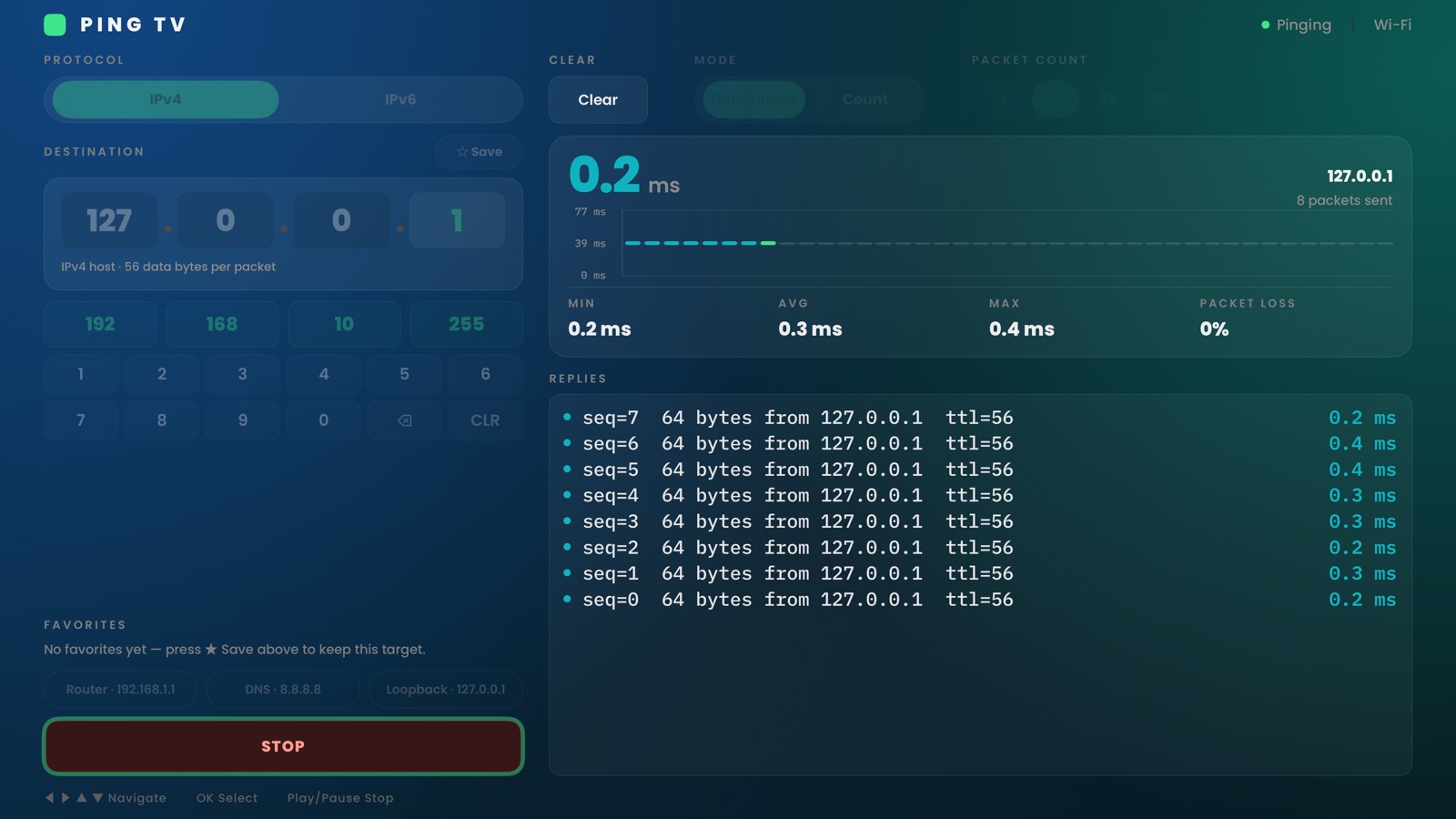
Ping TV sends ICMP echo requests straight from your Apple TV — IPv4 or IPv6, a single ping or a continuous run — with a live reply log, packet statistics, and a latency sparkline. No account, no ads, and nothing ever leaves your network.
What Ping TV does
A network diagnostic tool, not a network monitor — you start a run, watch it, and stop it.
IPv4 & IPv6
A dedicated four-octet keypad for IPv4, plus full hex entry for IPv6.
Finite or continuous
Send a fixed packet count or let it run until you stop it, with adjustable size, interval, and timeout.
Live reply log
Every reply lands in a newest-first log with sequence number, byte count, TTL, and round-trip time.
Stats & sparkline
Min / average / max latency and packet loss update live, next to a rolling latency chart.
Favorites & recents
Save the hosts you check often — your router, a DNS resolver, loopback — for one-click re-runs.
Siri Remote native
Every control is built for the remote: no on-screen mouse pointer, no fiddly typing.
Ping TV does not use /sbin/ping or a shell — tvOS exposes neither — so it implements ICMP echo itself. The reply format intentionally reads like the command-line tool you already know.
Support
We're a small team and read every message.
Get in touch
Questions, bug reports, or feature requests — email us and we'll get back to you.
Requirements
- An Apple TV HD or Apple TV 4K running tvOS 26 or later.
- A network connection (Wi‑Fi or Ethernet) — Ping TV pings hosts on your local network or the internet.
- No account, no NAS, and nothing else to set up.
Getting started
- Open Ping TV and choose IPv4 or IPv6.
- Enter a destination with the on-screen keypad, or pick a suggested target such as your router or a DNS resolver.
- Choose Continuous or a fixed packet Count, then select Start Ping.
- Star a destination to save it to Favorites for next time.
Troubleshooting
Every reply shows 100% packet loss
Confirm the address is reachable from your home network — try your router's IP first. Some servers on the internet intentionally block ICMP (ping), which shows as loss even though the service itself is fine. If you're on a restrictive Wi‑Fi (e.g. guest networks, some hotel or campus networks), ICMP may be blocked entirely.
IPv6 addresses aren't resolving
IPv6 pings require your network to actually support IPv6 end-to-end. Many home routers and ISPs are IPv4-only; try an IPv4 target to confirm connectivity first.
Can I ping a hostname like example.com?
Not yet — Ping TV currently pings IPv4 and IPv6 addresses only. Look up the numeric address first (e.g. on your router, or with nslookup on another device) and enter that instead.
Latency looks higher than expected
Wi‑Fi introduces more jitter than Ethernet. For the most accurate readings, connect your Apple TV to your router with a cable, or ping a target on your local network (like the router itself) to rule out your internet connection.
Still stuck? Email pingtv@vto-software.nl and we'll help you sort it out.
Privacy Policy
Last updated: 7 September 2026
Ping TV is built around a simple principle: a network diagnostic tool has no business collecting your data.
This Privacy Policy explains how Ping TV ("the app", "we", "us") handles information when you use it. Ping TV is an Apple TV (tvOS) application published by VTO Software.
The short version: Ping TV does not collect, store, sell, or transmit any personal data. It has no accounts, no analytics, no advertising, and no servers of its own. The only network traffic it generates is the ICMP ping packets you ask it to send, straight from your Apple TV to the address you choose.
1. Information we do not collect
Ping TV does not collect or transmit to us:
- The addresses you ping.
- Personal information such as your name, email address, or location.
- Usage analytics, telemetry, crash reports tied to your identity, advertising identifiers, or device fingerprints.
Ping TV contains no third-party advertising, analytics, or tracking SDKs.
2. Information stored on your device
To be useful across launches, Ping TV saves a small amount of data locally, on your Apple TV only:
- Favorite and recent targets — the IP addresses you've saved or recently pinged.
- Preferences — your last-used protocol, mode, and packet options.
This stays on your Apple TV. Deleting the app removes it. It is never sent to us or to any third party.
3. Network connections
Ping TV communicates only with the destination address you enter, using standard ICMP echo requests. It does not phone home to VTO Software or to any analytics endpoint.
4. This website
The app itself carries no analytics. This support page does count visits, using Umami, which we host ourselves inside the EU. It sets no cookies, uses no advertising identifiers and does not follow you to other websites; it records only which pages are viewed and which source referred you. That needs no consent, so there is no cookie banner.
5. Children's privacy
Ping TV is not directed at children and does not knowingly collect any information from anyone, including children under 13.
6. Third-party services
Ping TV is distributed through the Apple App Store. Apple may collect information related to your download and use of the app in accordance with the Apple Privacy Policy. We do not control and are not responsible for Apple's privacy practices.
7. Changes to this policy
If this policy changes, we'll update this page and revise the "Last updated" date above.
8. Contact
Questions about this policy? Email pingtv@vto-software.nl.